Email us

malitanyo@gmail.com

Read, Learn and Apply

Splashscreen in your android app project

Sample code on how to create splashscreen in your project.
In my example i make swap the MainActivity.java to my splash.java the first load is splashActivity.java and after a few seconds the next is MainActivity.java load.


First let set-up the swap in our AndroidManifest.xml ill make the splash.java as a main.


Screenshot:


Next goto your java folder and create SplashActivity.java and paste this following codes.
NOTE: 3000 = 3 seconds interval before the MainActivity.java loads.
Screenshot:

In the last step goto your layout and create splash.xml paste this following code below.


end of tutorial.

Vertical and Horizontal scrollview in Android project

Tutorial on how to create a vertical and horizontal scrollview in app project layout.
If you have a multi button or image in your project etc. and you want to make look clean scrollview is my suggestion for the new developer because is easy to use.


codes for vertical scrollview. goto your Layout where you want to add the vertical scrollview and add this following codes.


Codes for horizontal scrollview.

Screenshot of Horizontal Scrollview:


Additional codes to make your scrollbar nice and clean.
Screenshot: end of tutorial.

Create share button in your app project

Let the user share your download apps links or share the article etc. This sample share function codes is very common and useful and easy to apply in your project.


Now lets start first goto your java files where the function button codes located and add this following codes.


Dont forgot to change market://details?id=com.malitanyo.TUT in to your apps project package e.g: market://details?id=You.Compony.name

Screenshot:


Next goto your layout and add this following codes.
Screenshot: end of tutorial.

Create a rate button in your app project

Add rate button in your app project, when user click the button the user automaticly redirect to playstore where your application uploaded.

Make sure your apps are upload and visible to playstore first to avoid getting error.

Now lets start first goto your java files where the function button codes located and add this following codes.


Dont forgot to change market://details?id=com.malitanyo.TUT in to your apps project package e.g: market://details?id=You.Compony.name

Screenshot:


Next goto your layout and add this following codes.
Screenshot: end of tutorial.

Play videos from url in android project

Creating video player in your android app project that play the videos from the url.


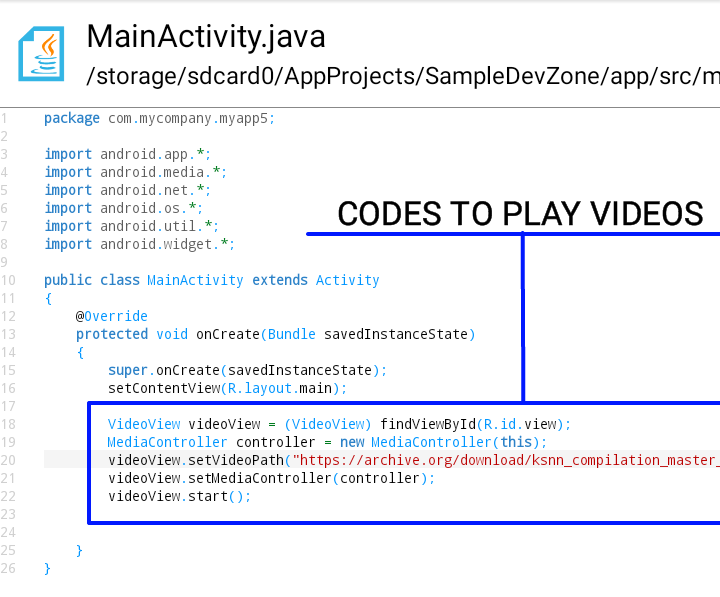
First goto your MainActivity.java or any java files that you want to put the videos player codes, here my full sample codes below.


Screenshot:


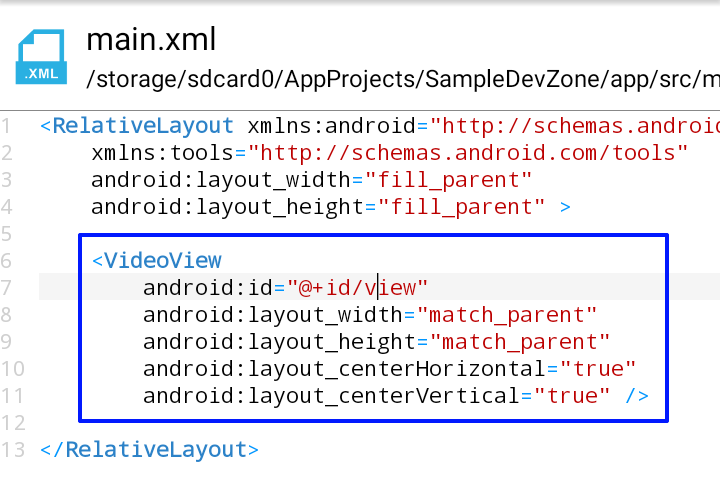
Next goto your Layout and add this following codes, located at res/layout/main
Screenshot:


Before start build your project make sure you add the internet permission in your project to allowed your application to connect to internet. if none goto your AndroidManifest.xml and add this two permission.

Done!

Codes for notification in android app

Codes for creating a notification in your android apps project. Do you want to add notification in your apps project when user click the button or notify the user when theres a new updates etc..

This a basic codes only but it useful and easy to use for new developers.


Now lets start. First goto your java codes where you want put the notification, sample code below.


Screenshot:


Next goto your string and add this following codes, located at res/values/string


And the final result will look like this Screenshot: Done. i hope you learn a basic notification codes for android app developing.
For more android apps develop by Malitanyo.
Please visit here: Malitanyo in Playstore.