 Youtube to MP3 is android app that convert the youtube videos into high quality mp3 music fast and easy converter.
For Android device: Download here
Youtube to MP3 is android app that convert the youtube videos into high quality mp3 music fast and easy converter.
For Android device: Download here

YouTube to MP3 Android apps
Youtube to MP3 is android app that convert the youtube videos into high quality mp3 music fast and easy converter.
For Android device: Download here

Create slide menu in android project
Tutorial on how to create slide menu in your app project using xml layout without java codes.
First we need to add support appcompat in ourBuild.gradle here the code for appcompat compile 'com.android.support:appcompat-v7:+' you need to add this code to avoid getting error
Next goto yourLayout and add this codes. example main.xml
And now the final results Screenshot:
end of tutorial. g
First we need to add support appcompat in our
Next goto your
And now the final results Screenshot:
end of tutorial. g
Android popup menu tutorial
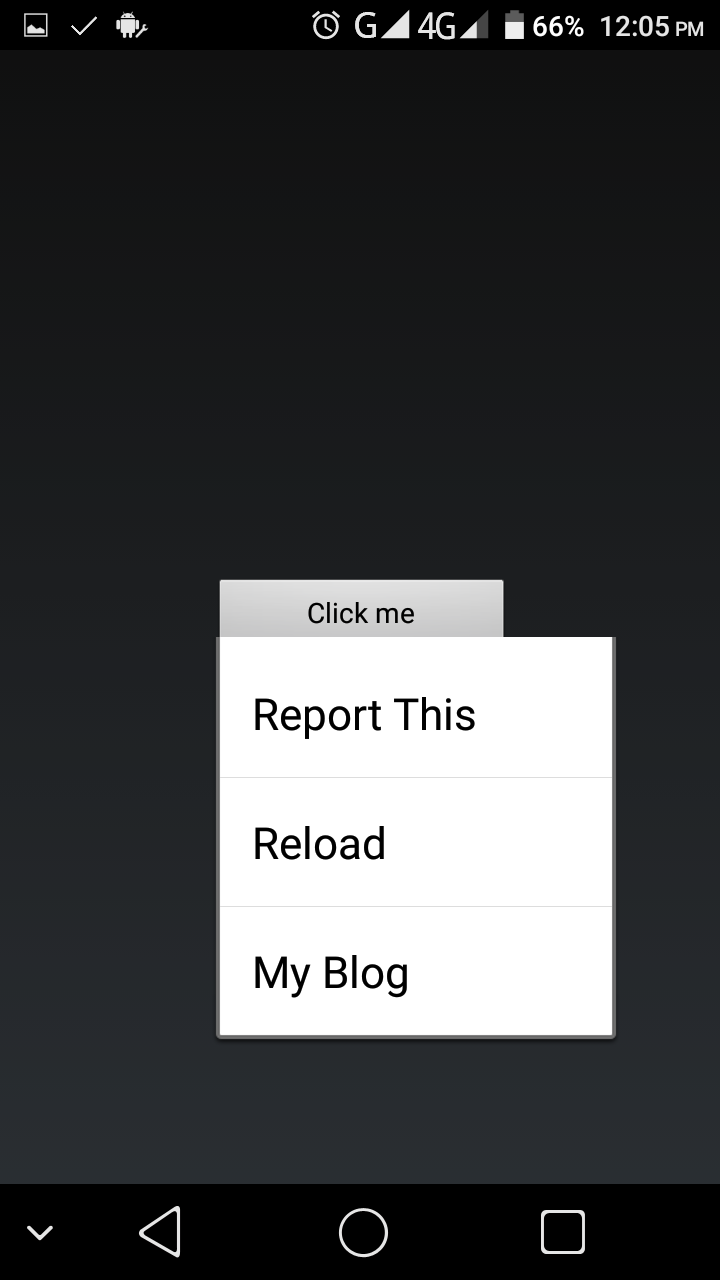
Tutorial on how to create popup menu in your android app project step by step. now i will give the full sample codes of popup menu to make your coding faster.
First goto yourMainActivity.java and paste this following codes.
Next goto youres/menu and create popup_menu.xml and paste this following codes.
In yourmain.xml add this button codes.
final result it will look like this.
Screenshot:
end of tutorial. g
First goto your
Next goto you
In your
final result it will look like this.
Screenshot:
end of tutorial. g

Transparent background in Android project
Tutorial on how to create transparent background activity in your android app project.
First goto yourAndroidManifest.xml and use this code as a theme of your activity android:theme="@style/Theme.Transparent" my full sample codes below.
Screenshot:
Next goto yourstyle.xml located at res/values/style.xml and add this code
Make sure your not set the background image or color in your layout. this is my sample layout.
end of tutorial.
First goto your
Screenshot:
Next goto your
Make sure your not set the background image or color in your layout. this is my sample layout.
end of tutorial.

Create popup activity in Android
Tutorial on how to create a popup activity in your android app project using. At this tutorial you can turn your some activity to popup.
Before you can set the popup activity in your project you need to addcompile 'com.android.support:appcompat-v7:+' or higher in your build.gradle
Next goto yourAndroidManifest.xml and add this code.
Screenshot:
And this is my sample codes on my layout
And final result it will look like this.
Screenshot: end of tutorial.
Before you can set the popup activity in your project you need to add
Next goto your
Screenshot:
And this is my sample codes on my layout
And final result it will look like this.
Screenshot:
end of tutorial.
Create feedback button in Android
Create a feedback button that send to your email account. At this tutorial when user click the button the user will ask what email provider that he want to use to send feedback.
I dont know what proper call on this tutorial but, this tutorial will help the user to send a feedback/message to the developer email.
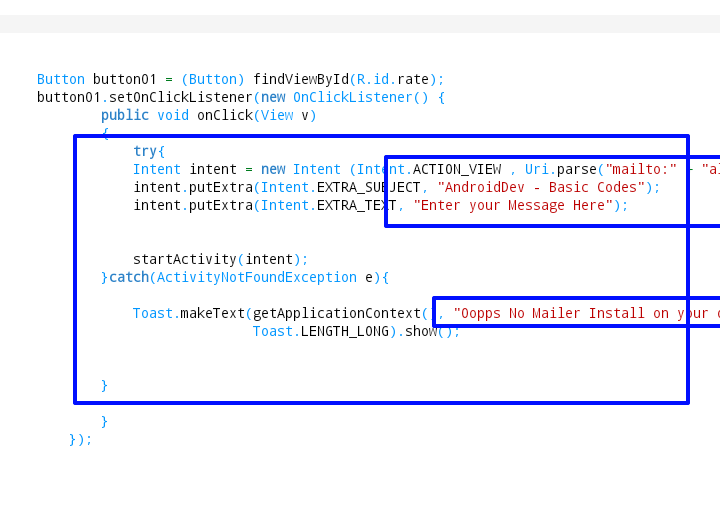
Now lets start, first goto your java file where do you want to add a feedback button. example MainActivity.java etc..and paste this following codes.
Dont forgot to change the your_acc_here@gmail.com into your email address,
AndroidDev - Basic Codes = Subject title
Screenshot:
Next goto your layout and paste this code if .
Screenshot:
end of tutorial.
I dont know what proper call on this tutorial but, this tutorial will help the user to send a feedback/message to the developer email.
Now lets start, first goto your java file where do you want to add a feedback button. example MainActivity.java etc..and paste this following codes.
Dont forgot to change the your_acc_here@gmail.com into your email address,
AndroidDev - Basic Codes = Subject title
Screenshot:
Next goto your layout and paste this code if .
Screenshot:
end of tutorial.

Splashscreen in your android app project
Sample code on how to create splashscreen in your project.
In my example i make swap the MainActivity.java to my splash.java the first load is splashActivity.java and after a few seconds the next is MainActivity.java load.
First let set-up the swap in ourAndroidManifest.xml ill make the splash.java as a main.
Screenshot:
Next goto your java folder and createSplashActivity.java and paste this following codes.
NOTE: 3000 = 3 seconds interval before the MainActivity.java loads.
Screenshot:
In the last step goto your layout and createsplash.xml paste this following code below.
end of tutorial.
In my example i make swap the MainActivity.java to my splash.java the first load is splashActivity.java and after a few seconds the next is MainActivity.java load.
First let set-up the swap in our
Screenshot:
Next goto your java folder and create
NOTE: 3000 = 3 seconds interval before the MainActivity.java loads.
Screenshot:
In the last step goto your layout and create
end of tutorial.

Vertical and Horizontal scrollview in Android project
Tutorial on how to create a vertical and horizontal scrollview in app project layout.
If you have a multi button or image in your project etc. and you want to make look clean scrollview is my suggestion for the new developer because is easy to use.
codes for vertical scrollview. goto yourLayout where you want to add the vertical scrollview and add this following codes.
Codes for horizontal scrollview.
Screenshot of Horizontal Scrollview:
Additional codes to make your scrollbar nice and clean.
Screenshot: end of tutorial.
If you have a multi button or image in your project etc. and you want to make look clean scrollview is my suggestion for the new developer because is easy to use.
codes for vertical scrollview. goto your
Codes for horizontal scrollview.
Screenshot of Horizontal Scrollview:
Additional codes to make your scrollbar nice and clean.
Screenshot:
end of tutorial.

Create share button in your app project
Let the user share your download apps links or share the article etc. This sample share function codes is very common and useful and easy to apply in your project.
Now lets start first goto yourjava files where the function button codes located and add this following codes.
Dont forgot to changemarket://details?id=com.malitanyo.TUT in to your apps project package e.g: market://details?id=You.Compony.name
Screenshot:
Next goto your layout and add this following codes.
Screenshot: end of tutorial.
Now lets start first goto your
Dont forgot to change
Screenshot:
Next goto your layout and add this following codes.
Screenshot:
end of tutorial.
Create a rate button in your app project
Add rate button in your app project, when user click the button the user automaticly redirect to playstore where your application uploaded.
Make sure your apps are upload and visible to playstore first to avoid getting error.
Now lets start first goto yourjava files where the function button codes located and add this following codes.
Dont forgot to changemarket://details?id=com.malitanyo.TUT in to your apps project package e.g: market://details?id=You.Compony.name
Screenshot:
Next goto your layout and add this following codes.
Screenshot:
end of tutorial.
Make sure your apps are upload and visible to playstore first to avoid getting error.
Now lets start first goto your
Dont forgot to change
Screenshot:
Next goto your layout and add this following codes.
Screenshot:
end of tutorial.
Play videos from url in android project
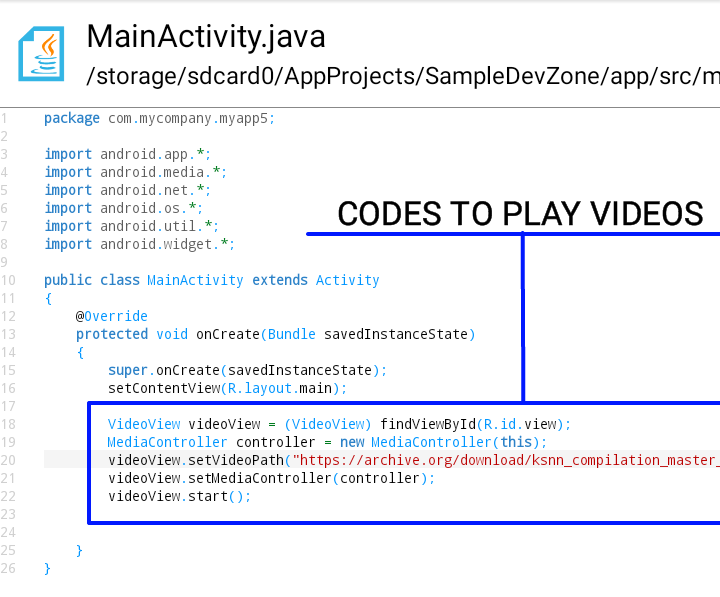
Creating video player in your android app project that play the videos from the url.
First goto yourMainActivity.java or any java files that you want to put the videos player codes, here my full sample codes below.
Screenshot:
Next goto yourLayout and add this following codes, located at res/layout/main
Screenshot: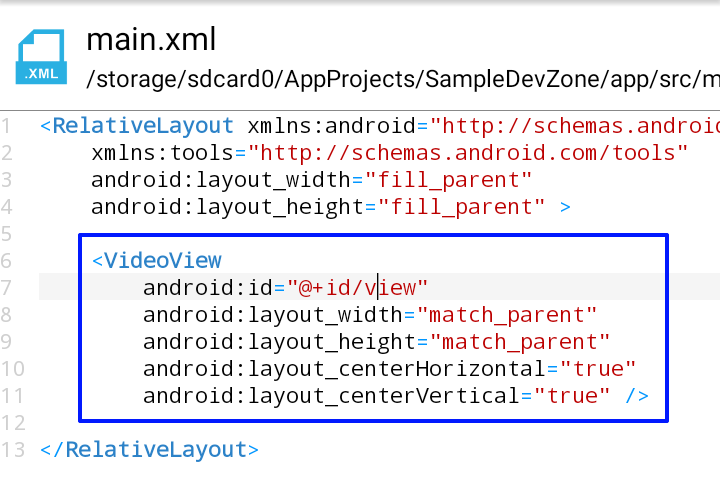
Before start build your project make sure you add the internet permission in your project to allowed your application to connect to internet. if none goto yourAndroidManifest.xml and add this two permission.
Done!
First goto your
Screenshot:
Next goto your
Screenshot:
Before start build your project make sure you add the internet permission in your project to allowed your application to connect to internet. if none goto your
Done!

Codes for notification in android app
Codes for creating a notification in your android apps project. Do you want to add notification in your apps project when user click the button or notify the user when theres a new updates etc..
This a basic codes only but it useful and easy to use for new developers.
Now lets start. First goto yourjava codes where you want put the notification, sample code below.
Screenshot:
Next goto yourstring and add this following codes, located at res/values/string
And the final result will look like this Screenshot: Done. i hope you learn a basic notification codes for android app developing.
This a basic codes only but it useful and easy to use for new developers.
Now lets start. First goto your
Screenshot:
Next goto your
And the final result will look like this Screenshot:
Done. i hope you learn a basic notification codes for android app developing.

Fullscreen no Status bar no Nav bar in Android project
Do you want to make your android app project full screen, hide the status bar and navigation bar?
Now i will give a basic codes to hide that.
First goto yourjava codes where you want to hide the status bar and nav bar. and add this following codes.
Screenshot:
Now you android app project turn into fullscreen without status bar and navigation bar.
First goto your
Screenshot:
Now you android app project turn into fullscreen without status bar and navigation bar.
Android Webview in AIDE IDE project sample codes
Tutorial on how to add webview in your android app project using AIDE IDE full working sample codes with screenshot.
This basic codes only, but it useful for new android app developer to create on first android webview.
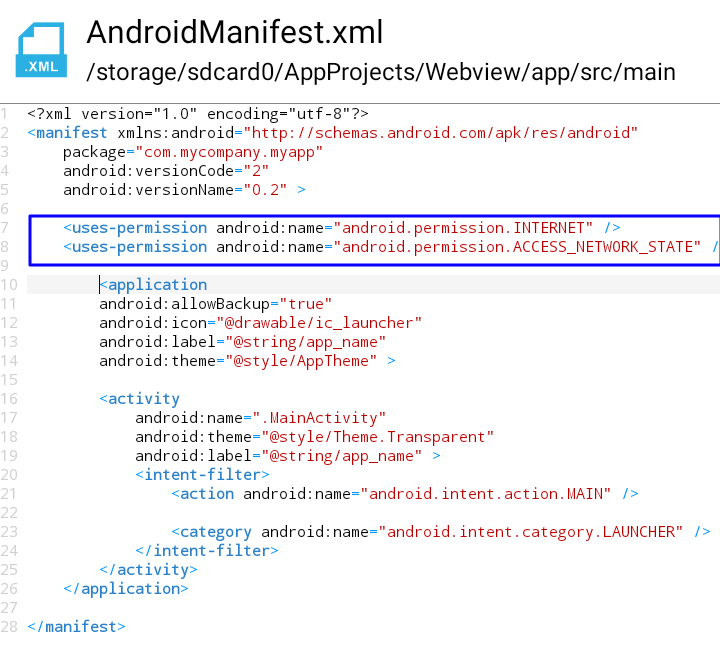
Now lets start, first gotoAndroidManifest.xml and add internet permission.
Screenshot:
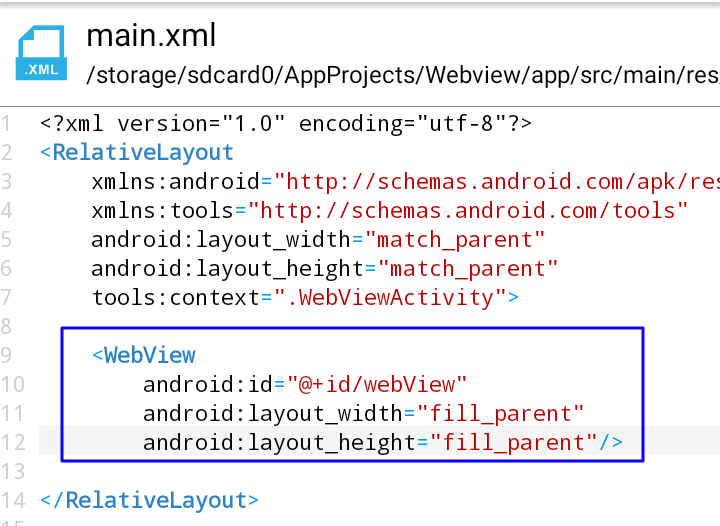
Next gotomain.xml and paste this following codes.
Screenshot
The last step is go to yourMainActivity.java and paste this following codes.
Code Number 1 Code Number 2 Code Number 3 Change thehttp://yourwebsite.com into your target website that you want load in your webview
Screenshot: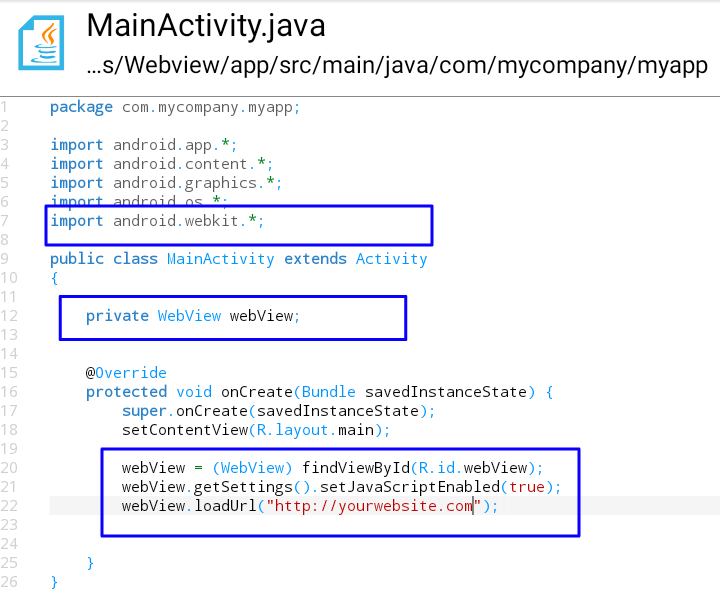 Now your done. You can start to test your project
This basic codes only, but it useful for new android app developer to create on first android webview.
Now lets start, first goto
Screenshot:
Next goto
The last step is go to your
Code Number 1 Code Number 2 Code Number 3 Change the
Screenshot:
Now your done. You can start to test your project

Html codes Encrypter Decrypter
Html codes encrypter and decrypter is now available in android application. Using this app you can encrypted and decrypted your html codes fast and easy ways. Download Html Codes Encrypter and Decrypter in Playstore.
→ Free Version [content Ads]
→ Paid Version [without Ads]
APP FEATURES:
+ Nornal Encryption.
+ Secure Encryption.
+ Encrypt with Password.
+ Offline

Anime Tagalog Dub
Anime tagalog dub is Android application where you can watch anime tagalog dubbed or Anime that translate into tagalog.
Anime tagalog dubbed is a free Android application where the user can watch anime tagalog dubbed anytime, anywhere. In order to watch or download the anime all user require internet connections.
Download the Anime Tagalog Dub latest version 5.0 [Aug 8 2020].
APP FEATURES:
+ Watch Anytime and Anywhere.
+ Watch Online.
+ Download your favorite Anime.
+ Easy to Access.
+ Lot of Anime Series upload.
Web Traffic Bot Android
Website traffic bot Android apps application free download. using this apps you can generate a free traffic in your blog or your website for free using your android device.How to use:
1) First download Web Traffic Bot in PlayStore.
+ Web Traffic Bot Rebuild [FREE version]
+ Web Traffic Bot Paid [PAID Version]
2) Install and Open and enter the website that you want to get free traffic.
3) Set the time interval between the next generate 5,000 = 5 seconds. and click the submit button.
App Features:
+ Set the time Interval.
+ 10k+ Unique random user agent.
+ 5k+ Unique random reffering urls.
+ Unlimited traffic generate.
For more android apps develop by malitanyo please visit here, for our app list Publish in Playstore.


